


Momo Live - Live Stream & Chat
3.539.00 Reviews
App Specs
- Version
- 2.1.0
- Updated On
- License
- Free
- Downloads
- 1,000,000+
- Developer
- Momo Group
- Categories
- Entertainment
- Platform
- Android
Screenshots


 Analysis by AppCompare
I judge a live-streaming app not only by what appears on screen, but by how easily I can find my way around, follow a conversation, and step away when the moment is not right for video or sound. That matters especially when I am browsing in a noisy room, using a smaller phone, or simply want to watch without joining in. Momo Live - Live Stream & Chat is an entertainment app from Momo Group, and its appeal is the mix of live viewing and real-time social contact. My experience left me curious about its community, but also aware that a lively feed can ask more of a viewer than a quiet, on-demand video.
Finding a comfortable way to explore
I’d use this section to focus on the small choices that can make browsing feel more manageable, especially when a busy live room competes for attention. Starting with a short, watch-only visit can help you judge the pace before deciding whether to chat, while keeping the experience on your own terms.
Readability and navigation in a live feed
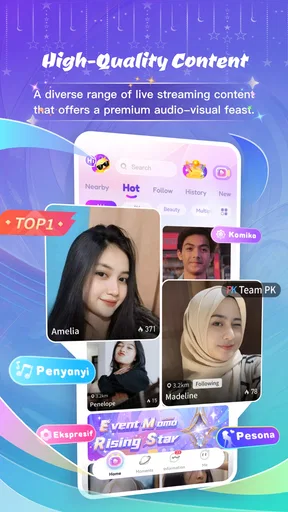
From the moment you open Momo Live, you're greeted with a vibrant interface that just invites exploration. Picture this: you can jump into live streams ranging from cooking shows to gaming marathons, or simply hang out in chat rooms where the conversations are as diverse as the users themselves. The app promises an entertaining vibe, and trust me, it delivers.
That energy is pleasant when I want to browse casually, but it can also make a first visit feel busy. Live platforms change as broadcasts begin and end, and a moving screen naturally competes for attention with chat. I recommend starting with one stream rather than opening several rooms in quick succession. It gives you time to work out where the host is speaking, where viewer messages appear, and whether you want to participate or just watch.
If you have trouble reading small text or tracking rapid chat, treat the video and conversation as separate activities. I find it easier to focus on the host first, then glance at the messages during a pause. This is a useful habit in any fast-moving live room: you do not have to keep up with every comment to enjoy the broadcast. A stream that feels too crowded is a good cue to leave and try a quieter one rather than forcing yourself to follow everything.
Getting started without rushing
Setting up is a breeze. Once you download the app, you can either sign up with your email or quickly link it to your social media accounts. I went for the latter, which took me less than a minute. After setting up, you're free to roam through the app's many offerings. The intuitive design makes navigation feel like second nature—no need for a manual here!
For a more considered start, I would take a moment after signing in to notice what the app asks you to do next and what you can skip. Linking a social account may feel convenient, but it is not automatically the right choice for everyone; some people prefer to keep entertainment accounts separate from their other online profiles. Choosing the sign-in route that fits your privacy comfort is more useful than saving a few seconds.
Worth Reading Before You Choose

EA SPORTS FC Mobile 26 Is a Bigger Football Game, but It Takes Time

Flipboard Shows What News Apps Must Do Beyond the Feed

Switching to Android Auto Means Rethinking Your Driving Routine

Google Calendar Makes a Crowded Week Easier to Manage

Ludo King Makes the Most of the Minutes Between Plans

Baby Panda World Brings Quick Play to Modern Phones, but Its Game Library Feels Busy
One practical way to learn the layout is to browse before joining a conversation. Watch how a room behaves, see whether the pace suits you, and only then decide whether to type. That small pause can help if you are shy, new to live chat, or using the app while doing something else. It also makes it easier to leave a room that does not feel welcoming without having already invested in a conversation.
Live streams, chat, and the value of choosing a pace
One of the standout features of Momo Live is the plethora of live streams available at any given moment. Whether you're into travel vlogs, music performances, or quirky how-tos, there's something for everyone. I found myself getting lost in a rabbit hole of fascinating content, much like you'd experience on a late-night YouTube binge.
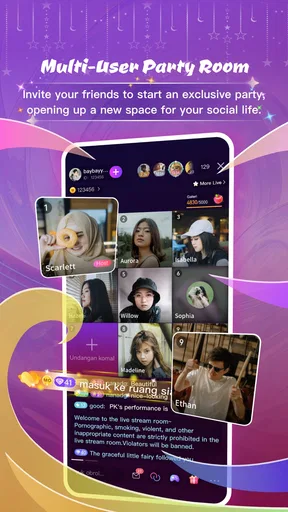
But the real magic happens in the chat feature. You can engage with streamers and fellow viewers in real-time, making the whole experience feel incredibly interactive. It's not just about watching; it's about being part of a community. The app also allows you to tip streamers with virtual gifts, which adds a fun layer of interaction.
That social layer is a genuine difference from an ordinary video platform, where comments are often separated from the viewing moment. Here, a message can feel like part of the event itself. The trade-off is that live chat moves on whether or not you can read quickly, and not every room will be equally easy to follow. If you prefer a carefully edited video that you can pause, rewind, or watch in silence, a standard video service will probably suit you better.
I would also approach virtual gifts as optional participation, not a requirement for enjoying a stream. They can be a playful way to show appreciation, but purchases can add up, so I would decide on a personal spending limit before using them. The app is free to download, while in-app purchases range from $0.29 to $799.99 per item; those amounts make it especially sensible to pause before confirming any paid interaction. A viewer who only wants to watch can keep that boundary clear.
Motor and sensory considerations while watching
Live chat can reward quick reactions, but it should not feel like a race. If tapping accurately is difficult, or you need more time to compose a message, you can stay with viewing and participate only when it feels comfortable. I would avoid trying to type while walking, carrying something, or splitting attention between the screen and a task. A live room will continue without an instant reply, and your safety matters more than keeping up with its pace.
Sound is another part of the experience to consider. A broadcast may be more engaging with audio, while a shared or noisy setting can make listening difficult or inappropriate. Before opening a stream in public, I would check whether I can listen privately and comfortably; if not, waiting until I have a suitable setting is better than straining to catch every word. People who are sensitive to changing sound or busy visual movement may also prefer short visits and a deliberate choice of calmer content.
For anyone who finds constant alerts distracting, the notification behavior may affect how usable the app feels beyond the time spent watching. I would begin with a brief session and notice whether the interruptions are helpful or simply pull attention away. The app’s notification system can feel overzealous, so checking available device-level notification controls is a practical way to reduce disruption if you do not want every update competing for your attention.
Community, boundaries, and situational access
Speaking of community, Momo Live excels in creating a welcoming atmosphere. Users are generally friendly and eager to chat, which is refreshing in the often impersonal world of online interaction. Plus, there’s a moderation system in place to keep things civil. No trolls in sight, which is always a win in my book.
A friendly first impression is encouraging, but I still treat a public chat as a public space. I would avoid sharing identifying details, and I would leave a room if the conversation made me uncomfortable. Moderation can help support a civil atmosphere, but it does not remove the need to use personal judgement. That is especially important for younger viewers: the app is rated Teen, so families should consider whether live conversations and social interaction are a good fit for the individual using it.
The best setting for Momo Live is one where you can give a little attention to what is happening. On a short break, I might open a stream, watch for a few minutes, and decide whether the host’s topic is worth staying for. On a commute or in a waiting room, I would be more selective: unpredictable audio, changing chat, and the temptation to keep scrolling can make it less convenient than a saved video or podcast. If connectivity is unreliable, a live broadcast is also less forgiving than content already stored on a device.
For creators or people who enjoy being noticed in a group, the live format can feel more immediate than posting a prepared clip. For someone who wants to share only with a known circle, or prefers an asynchronous conversation that can be answered later, a private messaging app or a conventional social feed is likely a better match. The key question is not whether live interaction is appealing in general, but whether you want to be present at the same time as other viewers.
Performance and the trade-offs of real time
Performance-wise, the app runs smoothly, even on my slightly outdated phone. Streams load quickly, and I experienced minimal lag, which is crucial for an app centered around live content. It's clear the developers prioritized a seamless user experience, and it shows in the app's reliability.
Even a smooth session depends on conditions outside the app, so I would not choose a live stream for a moment when interruption would be especially frustrating. A changing connection can affect real-time viewing more than a recorded clip, and a crowded room can make conversation hard to follow even when playback is fine. If a broadcast stutters or the audio becomes difficult to hear, leaving and trying again later is often more sensible than spending the whole session troubleshooting.
The app is free and has reached over 1 million installs, with an average rating of 3.4 from around 5,400 ratings. I read that combination as a reason to try it with realistic expectations, not as proof that every viewer will have the same experience. Its current version is 2.0.4, and it runs on Android 5.0 and later. There are around 30 written reviews, so I would put more weight on whether its live format and community suit my own habits than on any single score.
Where the experience still needs polish
While Momo Live has a lot going for it, there are a few areas where it could improve. For instance, the search functionality could be a bit more robust. Sometimes finding specific streams or topics feels like looking for a needle in a haystack. Additionally, a dark mode option would be a nice touch for those late-night streaming sessions.
Those limitations affect more than convenience. When discovery is imprecise, a person who already knows what they want may spend too long browsing instead of reaching a suitable broadcast. I would use the app with an open mind when I have time to explore, but choose a service with stronger topic-finding tools when I need to locate a particular subject quickly. The absence of a dark appearance option can also matter to people who prefer a dimmer screen at night; in that situation, keeping sessions brief or using the device’s own display settings may be more comfortable.
Another aspect that could use a bit of polish is the notification system. It tends to be a bit overzealous, pinging you for every little update. A more customizable notification setting would be a welcomed addition, allowing users to choose what alerts they receive.
That makes the app less suited to someone who wants an entertainment platform to stay quiet in the background. I would check the phone’s notification settings if alerts become disruptive, and I would avoid enabling notifications just because the app offers them. A live-streaming app is most enjoyable when I choose when to open it, rather than feeling pulled back by repeated prompts.
Who will enjoy it, and who may prefer another option
Overall, Momo Live - Live Stream & Chat is a standout app that combines the best of streaming and social interaction. It's perfect for anyone looking to discover new content while connecting with people from all over the globe. Whether you're a casual viewer or an aspiring streamer, this app offers something special.
I think it is most appealing to people who enjoy browsing without a fixed plan, like hearing reactions as events unfold, and are comfortable in open social spaces. It can also suit a creator who wants the immediacy of a live audience rather than the slower rhythm of posting a finished video. By contrast, it is less appropriate for viewers who need precise search, a quiet and predictable interface, or complete control over when content begins and ends. Those needs point toward on-demand video, podcasts, or private chat instead.
If you are unsure, try a short, low-pressure session: browse a couple of streams, watch without posting, and see whether the pace feels enjoyable. If you do decide to chat, start with a simple comment and keep personal information private. If you consider sending a virtual gift, treat it as a purchase rather than a casual tap. Those small choices make it easier to explore without turning entertainment into an obligation.
A more inclusive way to decide
So, if you're in the market for a fresh experience in the live streaming world, give Momo Live a shot. You might just find yourself hooked, just like I did. And who knows? You might even make some new friends along the way.
My recommendation comes with a condition: it works best when its live, social pace fits your attention, surroundings, and comfort with public conversation. I would choose it for an informal browse or a spontaneous exchange, and choose a quieter, more searchable, or more private alternative when those qualities matter more. The best reason to try it is the chance to share a moment with a live community; the best reason to step away is that you should never have to fight the interface, the noise, or the pace to enjoy your downtime.
Pros
- User-friendly interface
- easy to navigate.
- High-quality live streaming capabilities.
- Interactive chat features enhance engagement.
- Wide range of content categories available.
- Supports multiple languages for global use.
Cons
- Occasional lag during peak hours.
- Requires stable internet for optimal performance.
- In-app purchases can be pricey.
- Limited parental controls for younger users.
- Notifications can become overwhelming.
FAQs for Momo Live - Live Stream & Chat
What are the main features of Momo Live?
Momo Live offers a dynamic platform for users to engage in live streaming and real-time chat. Key features include high-quality video streaming, interactive chat rooms, virtual gifts, and the ability to connect with viewers worldwide. Additionally, users can monetize their streams, enhancing both the social and professional aspects of the app.
Is Momo Live free to use?
Momo Live is free to download and use. However, it offers in-app purchases for virtual gifts and other premium features. These optional purchases can enhance user experience by unlocking additional content or supporting favorite streamers. Users can enjoy the core functionalities without spending money, making it accessible to all.
How can I ensure my privacy and safety on Momo Live?
Momo Live prioritizes user privacy and safety by implementing robust security measures. Users are encouraged to review privacy settings, report inappropriate content, and block unwanted interactions. The app also includes community guidelines aimed at fostering a respectful and safe environment for all participants.
What devices are compatible with Momo Live?
Momo Live is available on both Android and iOS devices, ensuring a broad range of compatibility. The app is optimized for most smartphones and tablets, supporting various screen sizes and operating systems. Users should ensure their device meets the minimum OS requirements for optimal performance.
Can I earn money using Momo Live?
Yes, Momo Live offers monetization opportunities for streamers. Users can earn money through virtual gifts sent by viewers during live broadcasts. These gifts can be converted into real currency, providing an incentive for content creators to engage and build their audience. It's a popular option for those looking to monetize their streaming activities.


